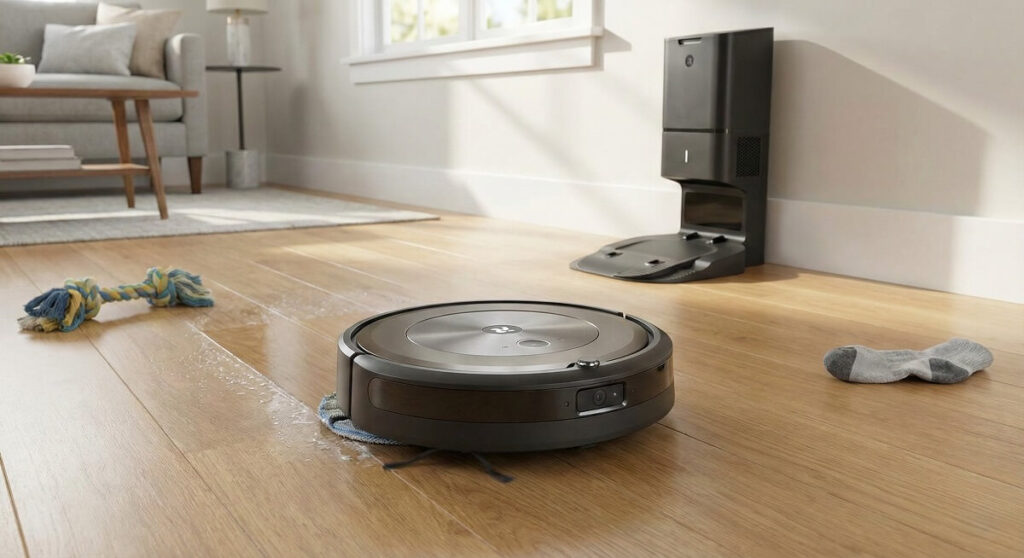
iRobot j5+ – Budget-Friendly Roomba That Demands Compromise
My 1995 Renault Safrane taught me something valuable: sometimes the affordable option with French quirks delivers surprisingly well, and sometimes it leaves you stranded in a party store parking lot wondering what you were thinking. The iRobot Roomba j5+ has that same energy. It’s positioned as the accessible entry point into iRobot’s premium lineup, promising obstacle avoidance, self-emptying convenience, and mopping capability at a price that won’t make you weep. But after analyzing published testing data and synthesizing hundreds of real user reviews, I’ve learned the j5+ is a robot of contradictions: genuinely capable in some areas, frustratingly inadequate in others.
The verdict? The Roomba j5+ earns a conditional recommendation. If you have primarily hard floors, need obstacle avoidance for pets or kids, and can accept the mop bin swap routine, it delivers solid value at $729.99. If you have mixed flooring, expect real mopping performance, or need premium suction power, keep looking.
The Bottom Line
The Roomba j5+ occupies an awkward middle ground in iRobot’s lineup. According to Vacuum Wars’ testing, it scored 82 on carpet deep clean tests—above their 77 average—and detected 9 out of 12 obstacles in avoidance testing, matching the performance of the more expensive j7+ and j9+ models. That’s genuinely impressive for a robot at this price point.
But here’s where I pump the brakes. The j5+ requires you to physically swap bins between vacuuming and mopping modes. Unlike the j7+ with its retractable mop arm, the j5+ will drag its mop pad across your carpet if you forget to switch bins. User reviews consistently describe this as “clunky” and “inconvenient.” And speaking of mopping, don’t expect actual floor cleaning—reviewers across the board describe it as “dragging a damp rag” rather than scrubbing.
Key Strengths
Obstacle Avoidance That Delivers
The PrecisionVision Navigation system uses a front-mounted camera to identify and route around obstacles. According to Vacuum Wars’ testing, the j5+ matched the j7+ and j9+ in obstacle detection, avoiding 9 out of 12 test obstacles. It recognizes cords, pet waste, socks, shoes, pet toys, pet bowls, and even your cats and dogs themselves.
iRobot’s P.O.O.P. guarantee (Pet Owner Official Promise) backs this up: if the robot runs over pet waste in the first year, they’ll replace it. That’s confidence you can appreciate if you’ve ever experienced the alternative.
Users consistently praise this feature in their reviews. One verified purchaser noted the cord detection was a “must have with all the cords I have lying around” and appreciated not needing to move anything before cleaning. For homes with pets and kids who scatter obstacles across floors, this is the j5+’s strongest selling point.
Solid Vacuuming on Hard Floors and Carpet
The 4-Stage Cleaning System with dual rubber brushes handles debris effectively. How-To Geek’s testing found it picked up “nearly all the tiny crumbs and dust bits” in fine particle tests, though larger debris like rice grains required about 50% pickup in a single pass. The patented Dirt Detect technology concentrates cleaning in soiled areas, and the robot automatically adjusts suction between carpet and hard floors.
For daily maintenance cleaning—keeping up with pet hair, dust bunnies, and general debris—the j5+ performs well. It’s not a deep-cleaning powerhouse, but it keeps floors respectable between thorough manual vacuuming sessions.
Self-Emptying Convenience
The Clean Base holds up to 60 days of debris in a 2.5L enclosed bag. For allergy sufferers, the HEPA-type filter traps dust and allergens during emptying. You’re not handling dusty bins after every run—you’re changing a bag every couple of months.
The 460ml onboard dustbin handles individual cleaning sessions without issue, and the automatic emptying process works reliably. Multiple users report the self-emptying feature as a major time-saver that justified the upgrade from base models.
Smart Mapping and App Integration
The iRobot Home App maps your home after a single run and lets you create room labels, set cleaning schedules, define Keep Out Zones, and control the robot via Alexa, Google Assistant, or Siri. The app receives consistent praise in user reviews for its clean interface and reliable functionality.
Multi-level mapping supports homes with multiple floors (you’ll need to carry the robot between levels), and the personalized cleaning recommendations adapt to your usage patterns over time.
Where It Falls Short
The Mop Bin Swap Is a Dealbreaker for Many
Here’s the fundamental problem: unlike the j7+ with its retractable mop arm that automatically lifts on carpet, the j5+ uses two separate bins—one for vacuuming, one for mopping. When you want to mop, you physically remove the dust bin and attach the mop bin. When you want to vacuum again, you swap back.
This isn’t just inconvenient—it’s problematic. If you leave the mop bin attached, the j5+ will drag its wet pad across your carpet. There’s no automatic carpet detection in mop mode. You must manually set “No Mop Zones” in the app for every carpeted area, and if you forget or the zones aren’t precise enough, you’ll have wet carpet.
User reviews repeatedly cite this as a frustration. One reviewer described it as “more work to refill the reservoir, wash, and replace the cloth than it is to just Swiffer the floor.” The convenience factor that makes robot vacuums appealing gets undermined by manual bin management.
Mopping Performance Is Supplementary at Best
The mopping system lacks downward pressure—it’s essentially a dampened pad being dragged across your floor. Vacuum Wars noted performance varies by stain type: it handles dried coffee reasonably well but achieves only average results on dried grape juice and other sticky residues.
User after user describes the mop as “useless,” “dragging a dirty damp rag,” or “like a wet Swiffer but worse.” The water reservoir requires frequent refills for full-house coverage, and dried or stuck-on messes require manual intervention regardless.
If you’re buying the j5+ expecting genuine mopping capability, recalibrate your expectations. Treat it as a vacuum that can optionally dampen your hard floors—not a mopping solution.
Single Suction Level Limits Versatility
How-To Geek’s review noted the j5+ offers only one suction level—no power adjustments for different floor types or cleaning scenarios. While the robot automatically adapts suction between carpet and hard floors to some degree, you can’t manually boost power for heavily soiled areas or reduce it for quiet operation.
Competitors at similar price points typically offer multiple suction modes. This single-mode approach limits the j5+’s versatility, particularly for homes with high-pile carpet or embedded dirt that benefits from maximum suction.
The Self-Empty Base Is Loud
When the j5+ docks and empties its bin, the noise level jumps dramatically. Multiple reviewers describe it as sounding “like a jet engine” or startling them from across the house. While the vacuuming itself is tolerable—you can watch TV in the same room—the self-emptying cycle is disruptive.
If you’re scheduling cleaning while you’re home, expect to pause conversations or leave the room when the robot returns to base. If you’re running it while away, this won’t matter. But the noise level is worth noting for remote workers or stay-at-home situations.
Hair Wrapping Requires Regular Maintenance
Despite the dual rubber brush design meant to resist tangles, user reviews consistently report hair wrapping around brushes and wheels. One user noted needing “little scissors to remove” wrapped hair after each cleaning. Another reported having to “take it apart and cut the hair out” regularly.
The narrow throat between the dustbin and self-empty base is also prone to clogging with hair over time, leading to the robot falsely detecting a “full” bin or misidentifying which bin is attached. This maintenance burden chips away at the convenience factor.
Real-World Performance: What Users Actually Experience
Published testing tells one story. Hundreds of user reviews tell another—more complicated—story. Here’s what emerges from synthesizing real owner feedback:
The Good (Consistent Praise)
- Hard floor performance is solid. Users with primarily tile, hardwood, or laminate report clean floors and effective debris pickup. The robot handles daily dust, pet hair, and crumbs without issue.
- Obstacle avoidance works as advertised. Pet owners and parents consistently praise the j5+’s ability to navigate around toys, cords, pet bowls, and sleeping pets without getting stuck or creating messes.
- Setup is straightforward. The app-guided setup process receives praise for clarity, and most users report successful initial mapping within a few runs.
- Preowned units can be excellent value. Some users report purchasing refurbished or preowned j5+ units that arrived “nearly brand new” with all accessories and worked perfectly—significant savings on an already mid-priced robot.
The Bad (Recurring Complaints)
- Navigation degrades over time. Multiple users report the j5+ working well for 3-6 months, then developing “navigation errors” where it wanders aimlessly, repeatedly bumps into furniture, or fails to return to the dock. One long-term reviewer documented the robot driving “right past the dock, turn around, go into the next room, vacuum for a while, and then let out a plaintive bleep and die.”
- Battery management issues. Several users report the robot failing to reach the dock before the battery dies, even when it announces it’s returning to charge. “It heads back in the right general direction but wanders off before getting there” describes a pattern multiple owners experience.
- Bin detection errors. The robot sometimes falsely detects the mop bin is attached when the vacuum bin is installed, or claims the bin is full when it’s nearly empty. Users report having to disassemble and clean sensors regularly to resolve these issues.
- Customer service frustrations. Reviewers describe outsourced support that “reads the minimally informative web page at you” without resolving issues. Warranty claims and repairs receive mixed reviews, with some users reporting lengthy turnaround times or replacement units with identical problems.
- Non-iRobot battery warnings. At least one user reported their robot suddenly refusing to operate after months of use, displaying “Please install an iRobot brand battery”—despite the battery working fine previously. This suggests potential software-level restrictions on third-party replacement parts.
The Pattern
What emerges is a robot that delivers good initial performance but has a concerning rate of issues developing after 6+ months of use. When it works, users appreciate the convenience. When problems arise, resolution is inconsistent and often frustrating. The polarized reviews—many 5-star experiences alongside detailed 1-star chronicles of frustration—suggest quality control variability or software issues that affect some units more than others.
Specifications at a Glance
| Specification | iRobot Roomba j5+ |
|---|---|
| Price | $729.99 (j5+) / ~$500 (j5) |
| Dimensions (Robot) | 13.3″ x 13.3″ x 3.4″ |
| Weight (Robot) | 7.5 lbs |
| Clean Base Dimensions | 15.8″ L x 12.2″ W x 13.3″ H |
| Clean Base Weight | 8.7 lbs |
| Dustbin Capacity | 460 ml |
| Self-Empty Capacity | 2.5L (up to 60 days) |
| Battery Life | ~180 minutes |
| Coverage Area | ~1,000+ sq ft per charge |
| Navigation | PrecisionVision (camera-based) |
| Obstacle Avoidance | Yes (cords, pet waste, shoes, pets) |
| Mopping | Yes (separate bin, no auto-lift) |
| Self-Emptying | Yes |
| Smart Home | Alexa, Google Assistant, Siri |
| Warranty | 1 year |
Who Should Buy the Roomba j5+
- Homeowners with primarily hard floors where the j5+ excels at vacuuming and the mopping limitation matters less
- Pet owners who need reliable obstacle avoidance to protect against cord tangles and pet waste incidents—the P.O.O.P. guarantee provides real peace of mind
- Parents with young kids who scatter toys, socks, and small items across floors daily
- Those who want iRobot’s ecosystem and app experience at a lower entry point than the j7+ or j9+
- Buyers willing to accept the mop bin swap in exchange for $200+ savings versus the j7+ with its auto-lifting mop
- Shoppers who find good sale prices or refurbished deals—the j5+ becomes much more compelling at $500 or below
Who Should Skip This One
- Homes with mixed carpet and hard floors where the mop bin swap becomes a constant hassle and carpet-wetting risk
- Anyone expecting real mopping performance—the j5+ dampens floors but doesn’t scrub or handle dried messes
- Users who need maximum suction power for high-pile carpet, embedded pet hair, or deep cleaning—competitors offer more suction at similar prices
- Those who value quiet operation—the self-empty base is disruptive if you’re home during cleaning
- Buyers who prefer low-maintenance devices—the hair wrapping, bin swapping, and sensor cleaning requirements add friction
- Anyone uncomfortable with cloud-connected devices—the j5+ relies on app connectivity for full functionality and doesn’t offer local control options
Frequently Asked Questions
Is the Roomba j5+ worth it over the standard j5?
The $200+ premium for the j5+ gets you the self-emptying Clean Base that holds up to 60 days of debris. If you don’t want to empty the dustbin after every run or two, it’s worth the upgrade. If you’re disciplined about manual emptying and want to save money, the standard j5 offers identical cleaning performance.
How does the Roomba j5+ compare to the j7+?
The j7+ costs about $200 more and adds a retractable mop arm that automatically lifts on carpet. If you have mixed flooring, the j7+ eliminates the mop bin swap frustration and carpet-wetting risk. If you have all hard floors, the j5+ offers essentially the same vacuuming and obstacle avoidance performance at lower cost.
Can the Roomba j5+ actually mop floors?
Technically yes, but with major caveats. The mopping system dampens floors with a wet pad but lacks scrubbing pressure. It handles light dust and fresh spills adequately but won’t remove dried or sticky messes. Most users describe it as “a wet Swiffer” level of cleaning. Consider it a supplementary feature, not a mopping solution.
How long does the Roomba j5+ battery last?
According to Vacuum Wars testing, battery life reaches approximately 180 minutes. This easily covers 1,000+ square feet per charge. If the battery depletes mid-clean, the j5+ returns to the dock, recharges, and resumes where it left off—though user reviews suggest this return-to-dock function doesn’t always work reliably over time.
Does the Roomba j5+ work in the dark?
The camera-based navigation requires some ambient light to function optimally. Unlike LiDAR-based robots that work in complete darkness, the j5+ may have reduced navigation accuracy in very low light conditions—something to consider if you schedule overnight cleaning.
How often do I need to replace the self-empty bags?
iRobot rates the bags at 60 days of capacity, but actual replacement frequency depends on your home’s debris load. Homes with multiple shedding pets may need monthly changes; minimal-debris homes might stretch to 2-3 months. The bags cost approximately $20 for a 3-pack through iRobot, making ongoing costs around $80-100 per year for average use.