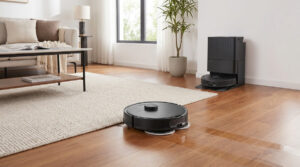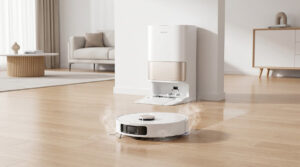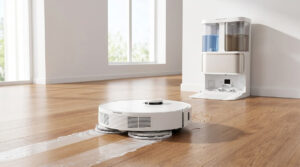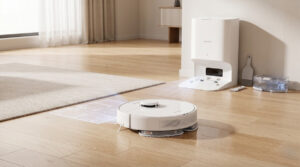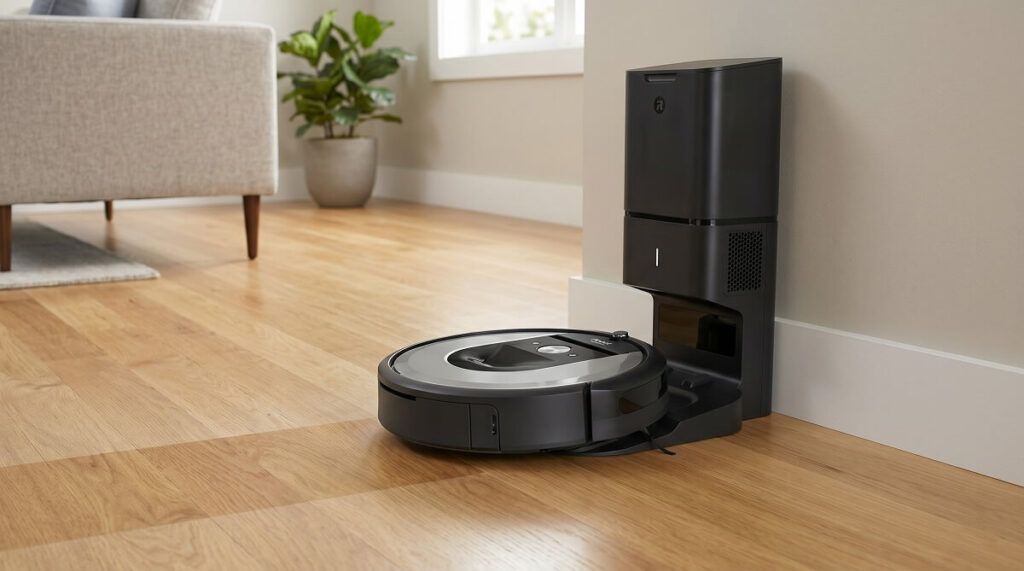
The iRobot Roomba 105 Vac with AutoEmpty Dock delivers solid cleaning performance and genuine hands-free convenience, though real owners report mixed experiences with the app and occasional mapping hiccups. After analyzing over 30 verified customer reviews, the consensus is clear: this vacuum excels at what matters most—picking up dirt, pet hair, and debris—while the 75-day self-emptying dock eliminates the biggest hassle of robot vacuum ownership. However, prospective buyers should temper expectations around the mopping feature on combo models and prepare for a learning curve with the Roomba Home app.
Quick Verdict: Who Should Buy the Roomba 105 Vac?
The Roomba 105 Vac with AutoEmpty Dock is best suited for busy households with pets who prioritize convenience over cutting-edge features. According to iRobot’s official specifications, this model delivers 70X more power-lifting suction than the Roomba 600 series, and the AutoEmpty dock holds up to 75 days of debris in allergen-trapping bags. At $299.99 (regularly $449.99), it represents iRobot’s most affordable entry into self-emptying robot vacuums.
Skip this model if you need obstacle avoidance for cluttered floors, prefer not to purchase replacement bags, or require flawless app performance. The Roomba 105 lacks the object detection found in premium models, meaning cables, socks, and small toys can still cause hangups during cleaning cycles.
What Real Owners Love About the Roomba 105
The overwhelming positive feedback centers on three areas: suction power, time savings, and the self-emptying convenience. Owners consistently praise how well the vacuum handles pet hair and daily debris without manual intervention.
- Powerful Suction for Pet Hair
- Multiple pet owners report significant reductions in visible fur and dust. One reviewer with three pets and three floors noted that “tumbleweeds of fur” that previously drove them “bonkers” are now handled automatically. Another owner with five cats and allergies called the vacuum “my new bestie” for keeping floors clean between professional deep cleans.
- Genuine Time Savings
- The set-and-forget nature of the Roomba 105 resonates strongly with busy families. A reviewer working 50+ hours per week alongside their spouse stated this purchase “changed my household,” while another noted they’ve “cut vacuuming to once a week for areas it doesn’t reach.” Parents particularly appreciate waking up or coming home to freshly cleaned floors.
- 75-Day Self-Emptying Dock
- The AutoEmpty dock receives consistent praise for reducing maintenance to near-zero. As one owner put it: “Not having to constantly empty the bin saves me time and annoyance.” The dock traps 99% of allergens as small as 0.7 microns, making it especially valuable for allergy sufferers.
- LiDAR Mapping and Navigation
- The ClearView LiDAR navigation earns positive marks for creating accurate home maps quickly—typically within 10 minutes according to iRobot. Owners appreciate the ability to customize room boundaries, set cleaning schedules, and choose specific areas to clean. One tech-savvy reviewer noted the mapping is “amazing” compared to competing brands.
Common Complaints and Frustrations
Despite strong overall satisfaction, real owners identify several recurring pain points that prospective buyers should consider before purchasing.
- App Experience Needs Improvement
- The Roomba Home app generates the most consistent criticism. Reviewers describe it as “cumbersome,” “clunky,” and prone to freezing. One owner noted that “one section of the app freezes when I click on it” requiring a complete app restart. Another complained that starting a basic clean involves multiple taps versus single-button operation on competitors. The inability to easily view battery charge status also frustrates some users.
- Wi-Fi Connection Challenges
- Initial setup sometimes proves frustrating due to Wi-Fi requirements. The Roomba 105 requires a 2.4 GHz network connection, and several owners report needing to temporarily disable their 5 GHz network or make router adjustments before successfully connecting. Once connected, the vacuum generally maintains a stable connection.
- Battery Life on Deep Clean Mode
- Some owners express disappointment with battery consumption during intensive cleaning. One reviewer noted the vacuum “kept running out of batteries” before finishing rooms, though it does return to charge and resume automatically. This appears most pronounced in homes with complex floor plans or heavy-duty cleaning requirements.
- Loud Emptying Cycle
- While the vacuum itself operates relatively quietly, the auto-emptying process is notably loud. Multiple reviewers compare it to “a jet engine about to take off.” This brief but intense noise burst occurs whenever the dock empties the dustbin, which may be disruptive in smaller homes or during early morning/late night operation.
- Getting Stuck on Obstacles
- Without dedicated obstacle avoidance sensors, the Roomba 105 can become tangled on cables, get caught under low furniture, or struggle with certain rug transitions. Owners consistently recommend a “pre-clean” to remove obstacles before scheduled runs. One reviewer emphasized: “Always double check to make sure there are no cords, blankets, socks, etc. in Roomba’s path.”
Cleaning Performance: How Well Does It Actually Clean?
The Roomba 105 Vac delivers above-average cleaning results according to both user feedback and independent testing. According to VacuumWars testing, the vacuum removed 82% of embedded sand in carpet deep clean tests, outperforming the category average of 75%.
Real owners confirm these results. The 3-stage cleaning system effectively handles daily debris, pet hair, and dust across multiple floor types. One reviewer with a short-haired but heavy-shedding cat praised how it “handles pet hair like a champ” without leaving clumps on hardwood floors. The vacuum transitions between hardwood, tile, carpet, and rugs without manual intervention.
Edge cleaning receives more mixed reviews. While the edge-sweeping brush cleans 20% better than previous Roomba generations according to iRobot, some owners note debris can be pushed outward rather than collected in tight corners. Navigation efficiency scores above average at 0.74 square meters per minute, meaning the vacuum covers ground efficiently without excessive back-and-forth.
Setup Experience: From Unboxing to First Clean
The initial setup process earns generally positive marks, though some owners encounter temporary hurdles. The consensus is that following a few best practices makes the difference between frustration and smooth operation.
Most owners complete setup in under 15 minutes. The process involves scanning a QR code from the box to download the Roomba Home app, creating an account, connecting to Wi-Fi (2.4 GHz only), and allowing the vacuum to map your home. One reviewer described it as “a piece of cake” while another called it “simple and easy.”
Experienced owners offer several tips for new users:
- Let the vacuum fully charge before the initial mapping run to avoid incomplete maps
- Temporarily disable 5 GHz Wi-Fi if connection issues occur
- Block off stairs and areas you don’t want mapped during the first run
- Remove floor obstacles before the mapping cycle
- Take time after mapping to name rooms and set up schedules properly
One common frustration: sharing app access between household members requires resetting the vacuum, which some owners found “a bit of a struggle.”
Long-Term Ownership: Maintenance and Reliability
After weeks of daily use, owners report the Roomba 105 maintains consistent performance with minimal required maintenance. The self-emptying dock significantly reduces hands-on time, though the vacuum isn’t completely maintenance-free.
Routine maintenance includes:
- Replacing the dock’s dust bags (iRobot claims 75 days, though actual duration varies by household)
- Cleaning the brushes periodically to remove wrapped hair
- Wiping the dustbin occasionally
- Replacing the filter every 3-6 months
The ongoing cost of replacement bags represents a consideration for budget-conscious buyers. At approximately $20 for a 3-pack, monthly costs range from $3-7 depending on cleaning frequency and debris volume. Some owners view this as a worthwhile trade-off for convenience, while others wish for a bagless option.
Reliability reports are generally positive. Most owners experience consistent daily operation with the vacuum following scheduled routines without intervention. Occasional mapping “hallucinations”—where the vacuum skips rooms or cleans unscheduled areas—occur but aren’t widespread complaints.
Roomba 105 Vac Specifications at a Glance
| Specification | Details |
|---|---|
| Suction Power | 70X more than Roomba 600 series |
| Navigation | ClearView LiDAR |
| Self-Empty Capacity | Up to 75 days |
| Multi-Level Mapping | Up to 3 floor plans |
| Robot Dimensions | 13.23″ L x 13.19″ W x 4.09″ H |
| Robot Weight | 6.24 lbs |
| Battery Type | Lithium Iron Phosphate (LFP) |
| Smart Control | App, Alexa, Siri, Google Assistant |
| Suction Levels | 4 selectable power levels |
| Allergen Capture | 99% of particles as small as 0.7 microns |
| Wi-Fi Requirement | 2.4 GHz network |
| Price | $299.99 (MSRP $449.99) |
The Bottom Line: Is the Roomba 105 Vac Worth It?
The iRobot Roomba 105 Vac with AutoEmpty Dock delivers on its core promise: effective, largely hands-free floor cleaning for busy households. Real owners consistently report cleaner floors, significant time savings, and genuine appreciation for the 75-day self-emptying dock. The LiDAR navigation creates efficient cleaning patterns, and suction power handles pet hair and daily debris effectively.
The trade-offs are real but manageable. The app needs polish, the emptying cycle is loud, and you’ll need to pick up floor clutter before scheduled runs. Ongoing bag costs add a few dollars monthly to ownership expenses. These aren’t dealbreakers for most owners, but they’re worth knowing upfront.
At $299.99 on sale, the Roomba 105 Vac represents strong value for anyone prioritizing convenience and brand reliability over bleeding-edge features. As one satisfied owner summarized: “It pays for itself” in time saved and cleaner floors. For pet owners, allergy sufferers, and busy families who want a dependable cleaning routine without daily intervention, the Roomba 105 Vac earns its place as a worthwhile investment.
Frequently Asked Questions
Does the Roomba 105 Vac work with 5 GHz Wi-Fi?
No. The Roomba 105 Vac requires a 2.4 GHz Wi-Fi network for initial setup and operation. Many owners report needing to temporarily disable their 5 GHz network or adjust router settings during setup. Once connected, the vacuum maintains a stable connection.
How loud is the AutoEmpty dock?
The emptying cycle is significantly louder than the vacuum’s normal operation. Multiple owners compare the sound to a jet engine, though the cycle lasts only about 30 seconds. Plan scheduled cleaning times accordingly if noise sensitivity is a concern.
Can the Roomba 105 Vac climb over rugs and thresholds?
Yes. Owners report the vacuum handles transitions between hardwood, tile, carpet, and area rugs without issues. It can climb onto most standard rugs and navigate between floor types automatically. Very thick or plush rugs may occasionally cause navigation challenges.
How often do the dust bags need replacing?
iRobot claims the bags hold 75 days of debris, but actual duration varies significantly by household. Homes with multiple pets or high foot traffic may need more frequent replacements. Bags cost approximately $20 for a 3-pack from iRobot.
Does the Roomba 105 Vac have obstacle avoidance?
No. The Roomba 105 Vac uses LiDAR for navigation and mapping but lacks dedicated obstacle avoidance sensors. It will bump into and potentially become tangled on cables, socks, toys, and other floor clutter. Owners recommend tidying floors before scheduled cleaning runs.